Special event stations
A special event station is a callsign activated over a date range, frequently by operators in several different places. That breaks three assumptions the contest logger was built on, and the SES event type addresses each.
What's different
There's no contest exchange and no score. Class and section are stored as NULL. The entry form asks for RST sent and received, name, QTH, grid, and a comment instead. Scoring, bonuses, the section views, the summary sheet and Cabrillo export are all hidden — there's no contest to submit to. The dashboard shows QSO totals and rate.
The ARRL section remains available as an optional field, on the event and per QSO, because plenty of special events run outside Field Day but operators still trade sections.
Each operator has their own location. LoTW signs by station callsign and
location. A distributed activation has one location per operator, so operators
enter their own grid and state when they join, and those become the
MY_GRIDSQUARE, MY_STATE and MY_CNTY on the contacts they personally
made. Taking the location from the event would stamp every operator's QSOs
with the same wrong location and produce a log that doesn't upload cleanly.
Two operators must not sign the call on the same band and mode at once. Special event rules generally permit one signal per band per mode. This is the part that needs real enforcement, and it's the reason the checkout exists.
Setting up
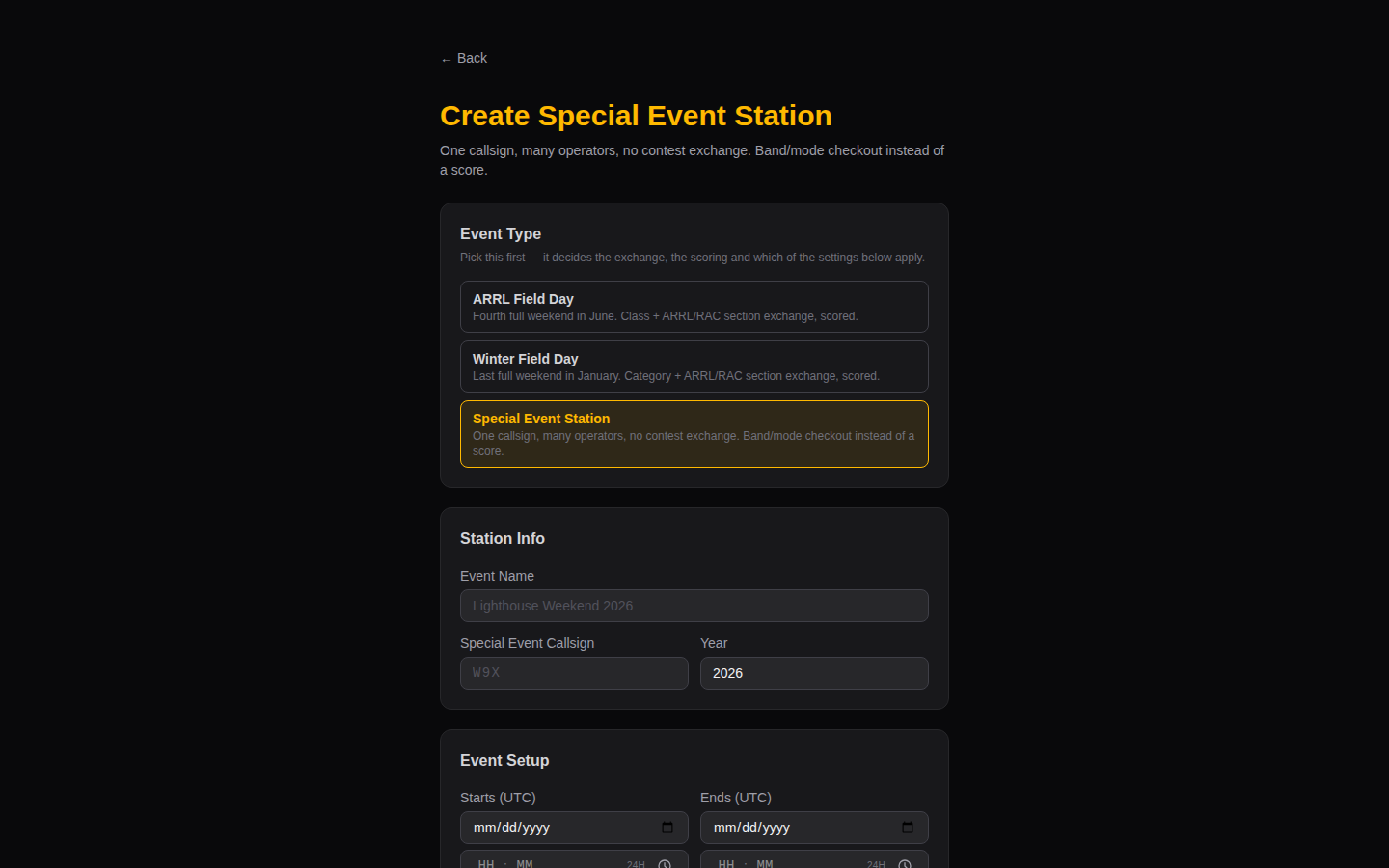
Choose Special Event as the event type. You get:
| Field | Meaning |
|---|---|
| Event name, callsign | What appears on the air and in the log |
| Starts / ends (UTC) | The activation window |
| Description, QSL info | Shown to operators when they join |
| ARRL section | Optional; becomes MY_ARRL_SECT in the ADIF |
| Enforcement | Whether logging without a checkout warns or is refused |
| Default slot length | How long a checkout runs by default |
| Duplicate rule | Defaults to once per band/mode per UTC day |
| Require operator approval | Off by default |
The dupe rule default differs from the contests deliberately: over a multi-week special event, working the same station again next weekend is normal rather than a mistake.
The call checkout
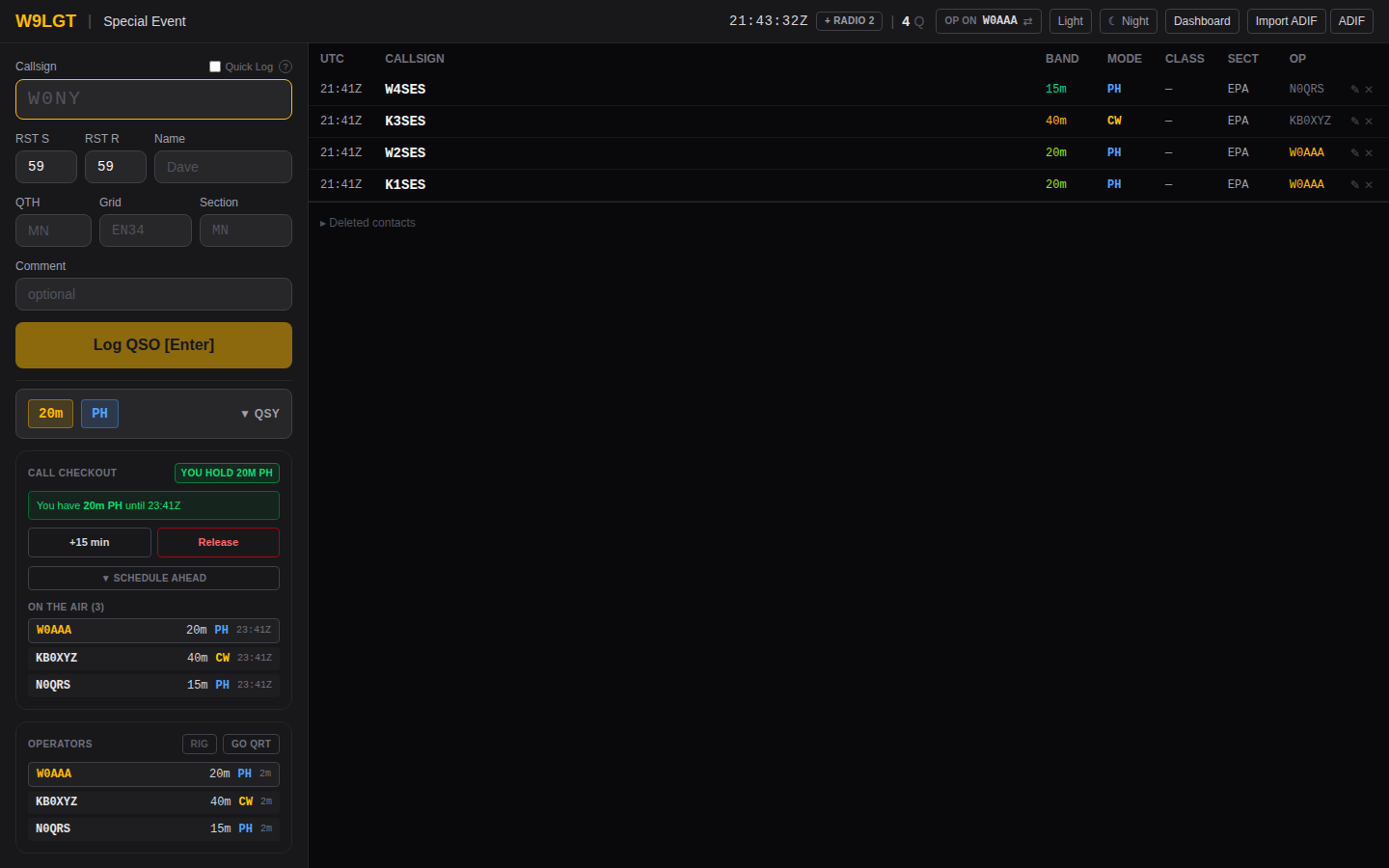
Operators claim the callsign for a band and mode from the Call Checkout panel.
| Action | Effect |
|---|---|
| Check out | Claims band + mode for the chosen length. Refused if anyone already holds that band and mode for an overlapping window |
| +15 min | Extends your slot. Refused if someone else already holds the window you'd extend into |
| Release | Frees the slot immediately rather than at its scheduled end |
| Schedule ahead | Books a future window; cancel your own bookings from the upcoming list |
Overlap is prevented by a database constraint, not by a check in the application. Two operators clicking at the same instant cannot both succeed — the loser gets a clear message naming the current holder and when their slot ends. See Database for the mechanism.
Granularity is band + mode and is deliberately not finer. Frequency-level
slots would let the system bless two signals on one band and mode, which the
rules generally forbid. The planned_freq field records an intended frequency
for humans to read and carries no exclusivity.
The whole schedule, on the dashboard
The panel above is one operator's view of their own slot. The dashboard has a Checkouts tab with the schedule for the entire event.
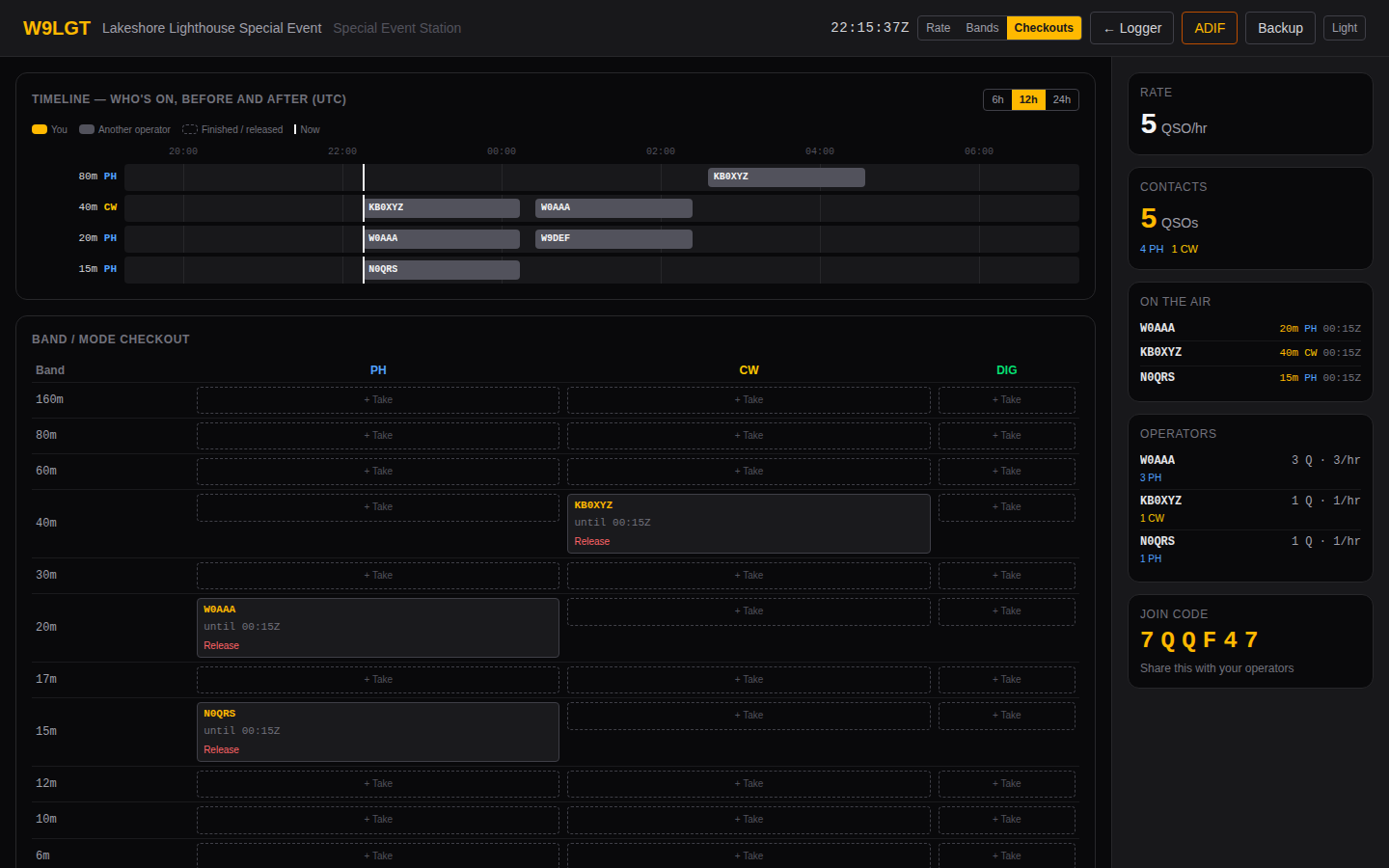
The top half is a timeline of who holds what, running from before now to after — switchable between 6, 12 and 24 hours, with a marker for the current moment, so a coordinator can see both what is on the air and what has been booked ahead. The bottom half is the live grid: every band against every mode, with the current holder and their expiry, and + Take on anything free.
Claiming and releasing work the same here as in the logging panel, against the same constraint — this is a second view of one set of reservations, not a second mechanism.
The Checkouts tab appears on special events only. Contests can claim band and mode slots too since #21, but they do it from the logging panel; the board labels holders by callsign, which is right for a special event and wrong for a contest, where a slot belongs to a station rather than a person.
Staying on past your slot
A slot within 10 minutes of expiring extends automatically — but only for an operator who has logged a QSO in the last 15 minutes. Without that condition a forgotten browser tab would hold the callsign indefinitely and nobody else could check it out.
Quick Log
A special event has no contest exchange to collect, so there is a Quick Log tick beside the callsign box: with it on, Enter logs the contact straight from the callsign field without moving through the other boxes. For a pile-up where you are recording little more than who you worked, that is the whole entry.
Anything you have filled in still goes with the contact — RST, name, grid — so it is a shortcut past the fields you are leaving empty, not a different kind of log entry.
It is offered on special events only. Field Day and Winter Field Day require a class and a section from every station, per contact, and those are the exchange: logging from the callsign field would file whatever happened to be left in the boxes. The setting is remembered per browser, so it is switched off on a contest even if you turned it on at a special event.
Running two radios at once
One operator on two rigs — 20m phone on one, 40m CW on the other — is a normal special event pattern, and the checkout has always allowed it: slots are exclusive per band and mode, not per person, so holding two at once is legal.
Each radio is its own logging window. Choose Open station 2 from the ☰
menu to open one; it is a full logger at ?station=2, and its own menu offers
Open station 3
if you need it. Everything is per window from there: each shows what that
radio holds, going QRT shuts down only that radio, and changing band in one
releases only that radio's slot.
If you use rig control, each radio needs its own bridge process on its own port. Station 1 uses the default, so a single-radio setup needs no arguments; station 2 listens on 4576, station 3 on 4577, and so on:
# radio 1 — the default
$ python3 ezfd-rig-bridge.py --rigctld-port 4532

# radio 2
$ python3 ezfd-rig-bridge.py --port 4576 --rigctld-port 4533
Both radios log under the same operator callsign, which is what the ADIF
OPERATOR field and the roster record. The station number distinguishes the
windows, not the person.
Enforcement
Set per event:
- Warn only (default) — logging on a band and mode you don't hold shows a warning and records the QSO anyway.
- Block logging — the QSO is refused.
Warn is the default on purpose. Refusing to record a contact that already happened on the air loses real data, which is worse than an overlap warning. Choose Block for a strictly coordinated event where you'd rather stop the operator than reconcile later.
QSOs replayed from the offline queue always bypass this, under either setting. By the time a browser reconnects the slot has certainly expired, and the contact is already in the past.
The operator roster
Operators enter their grid and state when they join; that's the roster. A coordinator can review and correct it from the admin console — List / manage events → open the event → Manage operator roster — which also shows who is currently on the air.
Removing someone from the roster revokes their access but deliberately keeps the QSOs they logged. Contacts they made are still real.
Approval gating
Off by default, so an SES behaves like every other event: the join code is the only gate.
Turn it on and a newly-joining operator lands in the roster as pending. They see a banner on the logging page saying so, and the server refuses their QSOs until a coordinator approves them in the admin console. As with the checkout, replayed QSOs are still accepted.
This exists because a shared special event callsign is a bigger deal than a club's own call at one site — anyone with the join code would otherwise be transmitting under it.
Exporting
ADIF only; Cabrillo is refused because there's no contest.
Each record carries STATION_CALLSIGN (the special event call), OPERATOR
(the individual at the key), and that operator's own MY_* location fields:
<CALL:5>K1AAA <BAND:3>20m <MODE:3>SSB <STATION_CALLSIGN:3>W9X
  <OPERATOR:5>W0AAA <MY_GRIDSQUARE:4>EN34 <MY_STATE:2>MN <MY_CNTY:8>Hennepin
  <RST_SENT:2>59 <RST_RCVD:2>57 <NAME:4>Dave <EOR>
<CALL:5>K2BBB <BAND:3>40m <MODE:2>CW  <STATION_CALLSIGN:3>W9X
  <OPERATOR:5>W1BBB <MY_GRIDSQUARE:4>FN31 <MY_STATE:2>CT <EOR>
One station callsign, two operators, two locations.
Filters let each operator pull their own slice:
| URL | Result |
|---|---|
/api/export/CODE |
The whole log |
/api/export/CODE?op=W1BBB |
Only that operator's QSOs |
/api/export/CODE?from=2026-06-01&to=2026-06-08 |
One window out of a longer event |
Filenames include the operator when filtered (W9X_SES2026_W1BBB.adi), so
collecting per-operator logs doesn't produce a directory of identical names.
Merging offline logs
Operators who logged in N1MM or N3FJP can merge with Import ADIF, in the ☰ menu. Records already present — matched on callsign, band, mode and a ±2 minute window — are skipped rather than inserted, so re-importing the same file, or two operators importing overlapping exports, can't double the log. The result reports them separately as "already in log".
Limits worth knowing
- Operator identity is self-asserted at join time. Approval gating controls who may log, but there is no password; the trust model is the join code plus the roster.
- The overlap guarantee is enforced at the database. It has been tested there directly, but not with many browsers under real concurrent load.
- Nothing in the SES path has yet been exercised by operators on real hardware. Worth a shakedown on a low-stakes activation first.